AI primer: chat models and decision engines
This page is for anyone who has used ChatGPT but never built with AI. No background is needed.
Two different jobs
Think of a shop with two kinds of staff.
- A writer answers customers' letters. Every answer can be different, creative, and long. If the writer is unsure, they still write something that sounds confident.
- A clerk handles requests at the counter. The clerk has a fixed list of things they are allowed to do: take a return, check stock, book a delivery. For every customer the clerk does one of those things, asks for the receipt if it is missing, or says "sorry, we don't do that here".
A chat model (an LLM, a large language model, like the one behind ChatGPT) is the writer. It is excellent at text.
Siliqun Rotor is the clerk. It is built to choose among the actions you allow, and to say so plainly when nothing fits.
Words you will meet in these docs
| Word | What it means |
|---|
| Tool or action | One thing your product can do, such as "apply for leave". You describe it once: its name, one sentence about what it does, and the values it needs (for example a date). |
| Request | What your customer typed or said. |
| Decision | What Siliqun Rotor concluded for one request. |
| Outcome | The kind of decision: decided (an action fits), ask (an action fits but a value is missing), confirm (an action fits and it changes data, so it waits for a yes), or refused (nothing fits). |
| Evidence | Why it decided that: which words matched which action, and where each value came from. |
| System One | Our name for the fast, decide-in-one-glance part of an assistant, by analogy with quick human judgment. The decision API is called /v1/systemone. |
| Flow | A saved assistant: your tools plus any rules, built in the Studio and called by your app. |
| Project key | A password for your app (not for a person) that lets it call your assistant. |
How a request travels
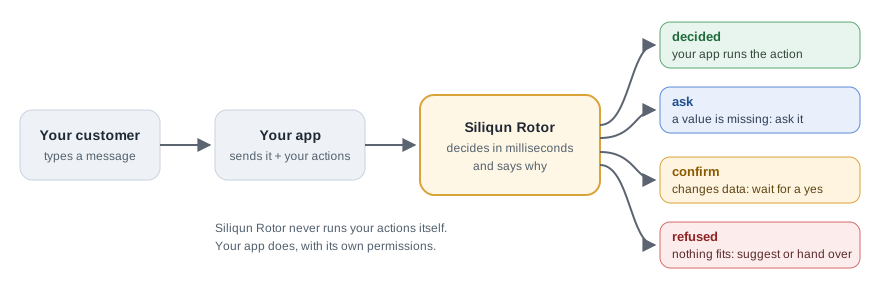
In this hosted integration, Siliqun Rotor returns an action proposal. Your application checks the customer's permissions and carries it out using its own services. An on-premises operator can separately configure execution bindings for the engine.
What a chat model would do differently
Take the message "Apply for sick leave tomorrow", with a leave tool that needs exact dates.
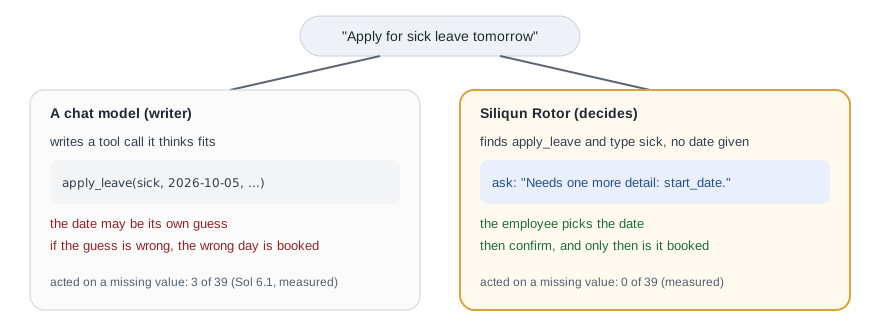
- A chat model, asked to produce a tool call, can pick a date itself ("tomorrow" becomes whatever date it assumes today is) and fill it in. If its guess is wrong, the wrong day gets booked. In our measured run, a leading chat model acted without a value the customer had given in 3 of 39 such requests; Siliqun Rotor in 0 of 39.
- Siliqun Rotor recognises the leave action and the type sick, sees that no date was actually given, and asks for it. Nothing is booked until the employee has chosen the date and pressed confirm.
Asking for missing values before your application acts is a design goal of the product. See the recorded behavior in the leave assistant example.
When to use which
- Use a chat model to write: replies, summaries, drafts.
- Use Siliqun Rotor to decide and act: which action, with which values, or ask, or refuse.
- Use both for a full assistant: Siliqun Rotor makes the decision, and a chat model (yours, with your own key) turns the result into a friendly sentence.
Honest limits
Siliqun Rotor only knows the actions you give it. When a request is worded in a way it cannot match with confidence, it refuses and names the closest action instead of guessing. Your app can then offer that action as a suggestion, ask the customer to rephrase, or pass the conversation to a person. A refusal is a safe answer, not an error.