Siliqun Rotor
The part of an AI assistant that makes its proposed action and reason visible.
You have probably used ChatGPT or a similar chat assistant. You type, it writes back. That works well when the answer is text for a person to read.
It works less well when the answer is an action in your product: book a day off, refund an order, change a customer record. A chat model writes something that looks like an action. Sometimes it picks the wrong one. Sometimes it fills in a date or an amount nobody gave it. Sometimes it acts when it should have asked first. In a chat, that is a funny mistake. In your product, it is a wrong booking or a wrong refund.
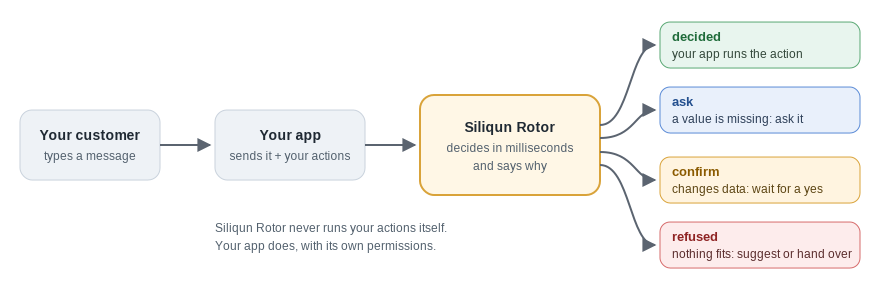
Siliqun Rotor is built for that second job. You give it the list of actions your product allows. These are common outcomes for a customer request:
| It... | When | Example |
|---|
| proposes the action | the message clearly asks for one of your actions, with the values it needs | "Apply for sick leave on 5 October" → apply leave: sick, 2026-10-05 |
| asks | an action fits, but a needed value is missing | "Apply for sick leave tomorrow" → which date? |
| refuses | none of your actions fits | "What's the weather tomorrow?" → no offered action fits |
It returns a decision with evidence and can ask for required details that are missing. If it cannot choose an action, your application can ask the customer to clarify or hand the request to a person. In the run flow shown here, a change waits for confirmation. Your product runs the approved action with its own permissions.
See it in 77 seconds
A neighbourhood bakery's assistant, built and tested in the Studio:
Open this page in the interactive docs to try the recorded example.
Try it
Step through a real conversation from an HR app's leave assistant, then click the other messages, including the ones it gets wrong:
Open this page in the interactive docs to try the recorded example.
Why not just use a chat model?
You can, and many teams start that way. Here is the same message handled both ways:
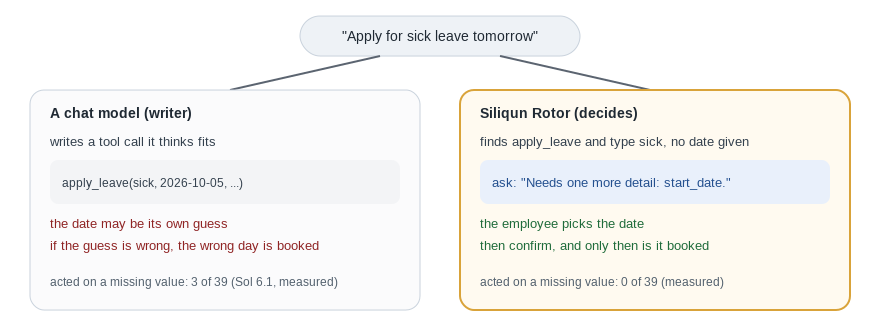
And here is what changed in our measured runs (3 October 2026) when Siliqun Rotor made the decision. The method and the files are published with the benchmarks.
| On 182 everyday business requests | Siliqun Rotor | A leading chat model (Sol 6.1) |
|---|
| Right decisions | 154 | 148 |
| Wrong actions taken | 2 | 6 |
| Acted although a needed value was missing | 0 | 3 |
| On 100 public benchmark requests (BFCL) | Siliqun Rotor | GPT-4o mini | Sol 6.1 |
|---|
| Correct decisions | 85 | 89 | 92 |
| Median decision time | 64 ms | 1.35 s | 2.9 s |
Read the second table honestly: on a broad public benchmark the large chat models still choose correctly a little more often. Siliqun Rotor's strengths are elsewhere. It decides in milliseconds instead of seconds, it does not act on missing values, it runs on your own computer at no cost, and every decision comes with its reason. Many teams use both: Siliqun Rotor returns the decision, your application authorizes and carries it out, and an optional chat model phrases the result.
Who this is for
- Students and makers who want an assistant that does real things without surprises. You can run the engine on your own laptop, free.
- Product teams adding an AI assistant to an app their customers already use.
- Companies that need every automated action to be explainable, or that must keep data on their own servers.
You do not need to know how AI models work to use it. You describe your actions in plain words, much like filling in a form.
What to read next
- AI primer: the difference between a chat model and a decision engine, in plain words, with no jargon. Start here if this page raised questions.
- Example: a leave assistant, end to end: watch a real employee conversation, what the engine decided at every turn, and the few lines of code your app needs.
- Studio first decision: build your first assistant in the browser, with no installation and no payment card.
- Quickstart: run the engine on your own computer and send it one request.
- Z-Script: small rules you can add, written almost like a sentence, for example "make the name lowercase before deciding".