Example: a leave assistant, end to end
The situation. A company's HR app has a chat box. Employees type requests in their own words. The company wants an assistant that books leave correctly, never books a day nobody asked for, and never cancels someone else's leave.
Everything below was recorded on 4 October 2026 on a local engine running the hosted service's serving stack (0a9cf79b0528994b). The engine's replies are quoted exactly; nothing was edited.
1. Describe what your app can do
The HR app offers three actions. You describe each one once, the way you would explain it to a new colleague: a name, one sentence, and the values it needs.
| Action | What it does | Needs |
|---|
get_leave_balance | Shows how many days of leave an employee has left, by type | leave type |
apply_leave | Requests leave for a date range; goes to the manager for approval | leave type, start date, end date |
cancel_leave | Cancels one of your own pending requests | request id |
Leave types are one of: vacation, sick, parental, unpaid.
2. The conversation
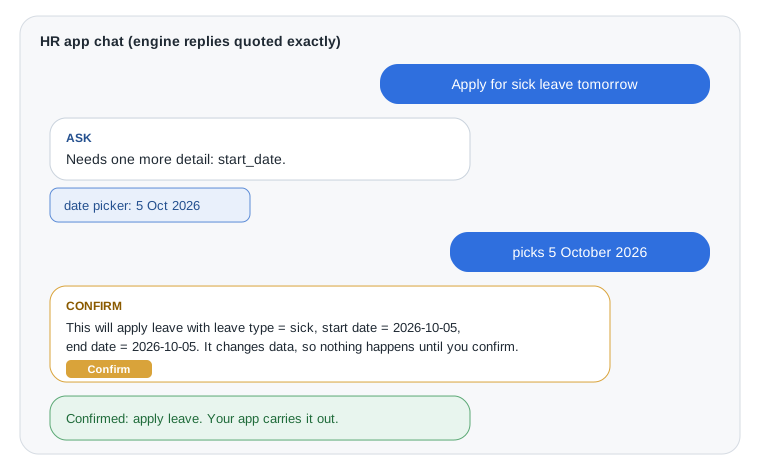
Step through it yourself, then try the other messages:
Open this page in the interactive docs to try the recorded example.
Employee: Apply for sick leave tomorrow
Siliqun Rotor decided: ask, "Needs one more detail: start_date." It recognised the leave action and the type sick, but no date was actually given ("tomorrow" depends on a calendar it does not assume). So it asks instead of guessing.
What the employee sees: your app shows a date picker under the message.
Employee: (picks 5 October 2026)
Siliqun Rotor decided: confirm. Its own summary: "This will apply leave (Request leave for a date range. The request goes to the employee's manager for approval) with leave type = sick, start date = 2026-10-05, end date = 2026-10-05. It changes data, so nothing happens until you confirm."
What the employee sees: that summary and a Confirm button.
Employee: (presses Confirm)
Siliqun Rotor decided: executed, "Confirmed: apply leave. Your app carries it out." The confirmed call, apply_leave(sick, 2026-10-05, 2026-10-05), is handed to your app, which files the request with its own HR system and permissions.
Other things employees typed, and what it did
| Employee typed | Outcome | What happened |
|---|
| How many vacation days do I have left? | decided | get_leave_balance with type vacation |
| I want to apply for vacation leave from 2026-10-12 to 2026-10-14 | confirm | apply_leave: vacation, 2026-10-12 to 2026-10-14, waiting for Confirm |
| I'd like to book annual leave next week | ask | "Needs one more detail: leave_type." ("annual" is not one of the company's types, so it asks) |
| Cancel my leave request LR-1042 | confirm | cancel_leave with request id LR-1042, waiting for Confirm |
| What's the weather tomorrow? | refused | "No offered tool fits this request closely enough." |
3. What a plain chat model would risk here
Asked to turn the same messages into tool calls, a chat model can fill in "tomorrow" with a date it assumes, or book "annual" leave as vacation without asking. Each of those is a quiet wrong action in a real HR system. In our measured business-request run, a leading chat model took 6 wrong actions and acted on a missing value 3 times; Siliqun Rotor took 2 wrong actions and acted on a missing value 0 times (benchmarks).
4. The code in your app
Your app sends the employee's message and your list of actions, then reacts to the outcome. In outline (Python, against your own engine on port 8700):
import requests, uuid

ENGINE = "http://127.0.0.1:8700"
run = requests.post(f"{ENGINE}/v1/runs", json={"input": message, "tools": TOOLS}).json()

if run["state"] == "ask":           # show a question or a picker for the missing value
    ask_user(run["why"], run["pending"]["params"])
elif run["state"] == "confirm":     # show the summary and a Confirm button
    show_confirm(run["pending"]["summary"])
elif run["state"] == "decided":     # a read-only action: run it now
    run_tool(run["evidence"])
elif run["state"] == "refused":     # nothing fits: suggest, rephrase, or hand over
    hand_over(run["why"])

# when the employee answers a question:
requests.post(f"{ENGINE}/v1/runs/{run['id']}/answer",
              json={"values": {"start_date": "2026-10-05", "end_date": "2026-10-05"}})

# when the employee presses Confirm:
requests.post(f"{ENGINE}/v1/runs/{run['id']}/confirm",
              json={"confirmation_id": run["pending"]["confirmation_id"],
                    "idempotency_key": str(uuid.uuid4())})   # pressing twice never books twice
This snippet illustrates the local run lifecycle used for this recording. It is not a hosted project integration. The Studio first decision guide is a simpler starting point: connect two read-only leave tools, test a decision, and obtain the integration code for an activated flow. It does not build the leave application or cancellation actions shown here.
5. Honest limits, from the same run
Siliqun Rotor refuses when it cannot match a request with confidence, and names the closest action. On this run that happened for some wordings it should handle:
| Employee typed | What it did | What a person would expect |
|---|
| How many sick days do I have? | refused (closest: get_leave_balance) | balance for sick leave |
| Can I take vacation from 2026-11-03 to 2026-11-05? | refused (closest: get_leave_balance) | apply for leave |
| Submit a vacation leave request for Oct 12 to Oct 14 | asked for start_date | read the dates (no year was given) |
| Cancel Ali's leave | asked for a request id | refuse: an employee may only cancel their own |
None of these produced a wrong action, which is the point of the design. But a refusal is still a dead end for the employee unless your app handles it. Offer the closest action as a suggestion ("Did you want to check your leave balance?"), or pass the message to a person. For actions that must only touch the employee's own records, keep that rule in your app as well: your app knows who is signed in, and the engine does not.